Built in Rust

Love your
terminal again.

Volt is a terminal-native API client built for speed. Navigate to any project — it discovers every route instantly. You're firing requests before a browser tab loads.
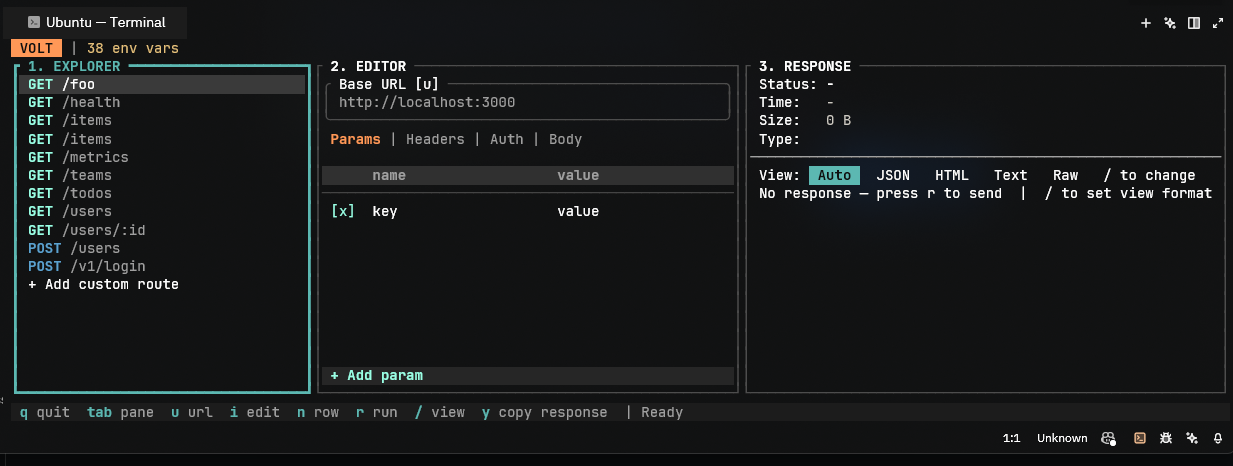
Volt interface
▸ RESPONSE · GET /api/users · 200 OK · 12ms
{
"users": [
{ "id": 1, "name": "Alice" }
],
"total": 42
}
$
Philosophy

Every feature in Volt has been built to make API testing feel native to the terminal.

Anything less isn't worth shipping. We built Volt from scratch for developers who live in the terminal — no electron, no browser tabs, no bloat.

Read the documentation →
Demo
What it does
01
Auto Route Discovery
Run volt in any project. It scans source files and lists every route instantly — axum, express, fastapi, next.js, and more.
02
3-Pane TUI
Explorer · Editor · Response. Full keyboard navigation, resizable panes, mouse support. Never leave the terminal.
03
Syntax Highlighting
JSON is pretty-printed automatically. Five view modes: Auto, JSON, HTML, Text, Raw. Switch with /.
04
Per-Route Persistence
Custom routes and base URLs saved to .volt_routes.json. Everything restored on next launch.
05
Full Request Editor
Edit headers, params, auth, and body. Supports JSON, plain text, form-urlencoded. URL history with ↑/↓.
06
Zero Config
No config files needed. No setup. Navigate to any project and type volt. Done.
What developers say

"I've started using Volt and I love it. Route discovery is genuinely magical. It found all 24 routes in my Express app instantly."

AK
Arjun Kumar
@arjun_dev · Backend Engineer

"Incredibly powerful out of the box. Switching to Volt cut my API testing loop in half. The keybindings feel immediately right."

SL
Sofia Larsen
@sofiacodes · Full Stack Developer

"The speed. I cannot get over the speed. From cold start to first request in under two seconds. Nothing else comes close."

MO
Lavanya Arora
@lavv · Rust Developer
Installation

Linux / macOS

One command installs the correct binary automatically.

curl https://raw.githubusercontent.com/frypan05/Volt/main/scripts/install.sh | bash
Installs to $HOME/.local/bin by default. Override with DIR=/usr/local/bin bash.
cd ~/your-project volt
Ubuntu, Debian, Fedora, Arch, macOS (Intel & Apple Silicon).

Windows

Use Windows Terminal and run:

irm https://raw.githubusercontent.com/frypan05/Volt/main/scripts/install.ps1 | iex
Open a new terminal after installing — PATH updates only in new sessions.
cd C:\your-project volt

Homebrew

Works on macOS and Linux with Homebrew installed.

brew tap frypan05/volt && brew install frypan05/volt/volt
Use frypan05/volt/volt — another tool named volt exists in core.
xattr -d com.apple.quarantine $(which volt)
Or: System Settings → Privacy & Security → Allow Anyway.

From Source

Requires Rust 1.75+.

git clone https://github.com/frypan05/Volt && cd Volt && cargo install --path .
cargo run
Supported Frameworks
Backend
  • axum
  • actix-web
  • express
  • fastify
  • fastapi
Frontend
  • next.js
  • react-router
  • vue-router
  • sveltekit
  • angular

Documentation

Everything you need to install, configure, and use Volt.

Installation

Linux / macOS

The install script detects your OS and architecture and downloads the correct binary automatically.

curl https://raw.githubusercontent.com/frypan05/Volt/main/scripts/install.sh | bash

Installs to $HOME/.local/bin by default. Override with DIR:

curl https://raw.githubusercontent.com/frypan05/Volt/main/scripts/install.sh 
    | DIR=/usr/local/bin bash

Windows

Open Windows Terminal (not cmd.exe) and run:

irm https://raw.githubusercontent.com/frypan05/Volt/main/scripts/install.ps1 | iex

Homebrew

brew tap frypan05/volt && brew install frypan05/volt/volt

On macOS, run once to allow the unsigned binary:

xattr -d com.apple.quarantine $(which volt)

From Source

git clone https://github.com/frypan05/Volt && cd Volt cargo install --path .
                    

Usage

Navigate to any project directory and run volt:

cd ~/your-project volt
                    

Volt scans the directory, populates the Explorer pane with detected routes, and opens the TUI. The default base URL is http://localhost:3000 — change it with u.

Custom Routes

Press Enter on + Add custom route in the Explorer to define a route not in your source code.

  • Select the HTTP method with /
  • Press Tab to move to the path field
  • Type the path and press Enter to confirm
  • Delete a route with d while selected in the Explorer

Keybindings

Global

Key Action
Tab Move focus to next pane
Shift+Tab Move focus to previous pane
q Quit
r Execute current request
u Edit base URL

Explorer pane

Key Action
j / ↓ Move selection down
k / ↑ Move selection up
Enter Open route / confirm add custom
d Delete selected custom route

Editor pane

Key Action
h / ← Previous tab
l / → Next tab
i Enter edit mode
n Add new row
Esc Exit edit mode

Response pane

Key Action
j / k Scroll response body
PgUp / PgDn Scroll by page
Home / End Jump to top / bottom
/ Open view mode picker
[ / ] Cycle view mode
y Copy response to clipboard

Supported Frameworks

Backend

  • axum — Rust
  • actix-web — Rust
  • express — Node.js
  • fastify — Node.js
  • fastapi — Python

Frontend

  • next.js — App & Pages Router
  • react-router
  • vue-router
  • sveltekit
  • angular

Persistence

  • .volt_routes.json — custom routes, restored on every launch
  • .volt.toml — app config including last used base URL

Add both to .gitignore if you don't want to commit them.

View Modes

Mode Behaviour
Auto Detects format from Content-Type
JSON Pretty-prints and syntax-highlights
HTML Syntax-highlights HTML
Text Plain text, no markup
Raw Raw bytes, no processing

Development

cargo run # run against current directory cargo test # run test suite
                    

Limitations

  • Route discovery uses regex heuristics, not full AST parsing. Dynamic routes may not be detected.
  • The body editor is optimised for payload editing, not general text editing.
  • Large responses rendered inline; paging/streaming planned for a future release.
  • Windows requires Windows Terminal. cmd.exe is not supported.